

ARC, the Audio Return Channel, lets a TV send sound back down the same HDMI cable to a soundbar or AV receiver, so the TV’s own apps and tuner play through the good speakers without a second cable. eARC, the enhanced Audio Return Channel, does the same with about ten times the room: enough for lossless surround sound and Dolby Atmos from a Blu-ray. Both ride on wires that were already inside the cable, and both lean on CEC, the control channel that lets one remote run everything.
First, what HDMI does
HDMI stands for High-Definition Multimedia Interface. Seven electronics companies, among them Sony, Panasonic, Philips and Toshiba, released version 1.0 in December 2002 to replace the bundle of analogue leads behind a TV with a single digital plug carrying picture and sound together. It was built on DVI, the digital computer-monitor connection of the day, which is why a passive DVI-to-HDMI cable still works for the picture.
An HDMI link has a direction. The source, such as a Blu-ray player, game console, set-top box or laptop, sends; the sink, a TV, monitor or projector, receives. For the first seven years that was the whole story: everything flowed one way, into the screen.
What happens when you plug it in
Before a single frame of picture arrives, the two ends have a short conversation on the cable’s low-speed wires. It is where many “no signal” and “no sound” problems actually live.
- Hot plug detect. The source powers pin 18 with 5 volts; the sink answers on pin 19 to say “something is here”.
- EDID, Extended Display Identification Data, is a small table stored in the sink listing every resolution, refresh rate and audio format it accepts. The source reads it over the DDC (Display Data Channel) wires and picks the best match. A soundbar or receiver in the chain edits this list to add what it can play, which is how a console learns it may send surround sound.
- HDCP, High-bandwidth Digital Content Protection, is the copy-protection handshake. If it fails, protected video such as streaming apps and Blu-ray shows a blank or error screen.
The problem ARC solves
By the late 2000s televisions had become sources themselves. A free-to-air tuner, then smart-TV apps, produced sound inside the TV, and the only way to get it to a home-theatre system was a second cable back out of the TV, usually optical. HDMI 1.4, in 2009, added the Audio Return Channel: the TV sends its sound back down the HDMI cable it is already connected with.
Only one port on most TVs can do this. It is labelled ARC or eARC, and the matching socket on the soundbar or receiver is usually marked HDMI OUT (TV ARC) or HDMI eARC.
Where the returning sound travels
The picture lanes can’t simply run backwards: they are built to transmit in one direction only. ARC uses spare wires instead. HDMI’s plug has 19 pins, and in the original design pin 14 was reserved for later. HDMI 1.4 put it to work as the utility line and paired it with pin 19, the hot-plug wire, to make a new two-wire channel called HEAC, short for HDMI Ethernet and Audio Return Channel.
ARC can run in two ways on those wires. In single mode it uses pin 14 alone, measured against ground. In common mode it rides on both 14 and 19 together, which leaves the pair free to carry the HDMI Ethernet Channel (HEC) as well, a 100 Mbit/s network link that almost no product ever used.
What travels on it is S/PDIF, the Sony/Philips Digital Interface from the 1980s: the same digital audio stream that goes down an optical (TOSLINK) cable, at a different voltage on copper. That one fact explains most of what ARC can and can’t do.
CEC: the part that makes it feel like magic
ARC moves the sound. CEC, Consumer Electronics Control, moves the commands. It is a single wire on pin 13, shared by every device in the HDMI chain, running at a few hundred bits a second. That is plenty for messages like “power on”, “switch to input 2” and “volume up”. It grew out of AV.link, the same idea on pin 10 of the old SCART plug.
With CEC on, turning on the TV wakes the soundbar, the TV remote’s volume keys drive the soundbar, and pressing play on a console switches the TV to the right input. Every TV maker gives CEC a brand name, which is why it is hard to find in the menus:
| TV brand | What CEC is called |
|---|---|
| Samsung | Anynet+ |
| LG | SIMPLINK |
| Sony | BRAVIA Sync |
| Panasonic | VIERA Link |
| Philips | EasyLink |
| TCL | T-Link |
| Others | “HDMI-CEC”, “HDMI control” or “device control” |
Plain ARC depends on CEC: it is how the TV and soundbar find each other and agree to switch the return channel on. When ARC “randomly stops working”, CEC is the usual suspect.
eARC: the same idea with ten times the room
S/PDIF was designed in the CD era. It carries two channels of uncompressed sound, or a squeezed (lossy) 5.1 surround stream such as Dolby Digital or DTS. The lossless home-theatre formats that arrived with Blu-ray need far more: Dolby TrueHD can use up to about 18 Mbit/s, DTS-HD Master Audio about 24.5. They never fitted through ARC.
eARC, the enhanced Audio Return Channel, was introduced with HDMI 2.1 in 2017. It throws S/PDIF away and drives the 14–19 pair as a proper high-speed differential link, two wires carrying equal and opposite signals so interference cancels out. It runs at about 37 Mbit/s, with a separate data channel of its own for discovery, lip-sync timing and status, so it doesn’t need CEC to find its partner (although most TVs still want CEC on for the remote-control side).
| Sound format | Optical | ARC | eARC |
|---|---|---|---|
| Stereo, uncompressed (PCM) | ✓ | ✓ | ✓ |
| Dolby Digital 5.1 (free-to-air TV, DVD) | ✓ | ✓ | ✓ |
| DTS 5.1 | ✓ | ✓* | ✓ |
| Dolby Digital Plus, incl. streaming Atmos | — | ✓ | ✓ |
| 5.1 / 7.1 uncompressed PCM | — | — | ✓ |
| Dolby TrueHD and Blu-ray Atmos | — | — | ✓ |
| DTS-HD Master Audio and DTS:X | — | — | ✓ |
* Many TVs won’t pass DTS out over ARC at all, or only from some inputs. That is a choice in the TV, not a limit of ARC itself, so check the TV’s manual if DTS matters to you.
eARC needs to be on both ends. If either the TV or the soundbar only has ARC, the link quietly drops back to ARC and its smaller list. eARC is part of the HDMI 2.1 specification, but plenty of TVs and receivers with otherwise HDMI 2.0-class ports have it too, so look for the eARC label rather than the version number.
Two ways to wire a room
The soundbar layout is the common one now, and it is the reason eARC matters: everything plugged into the TV has its sound passed through to the soundbar, and only eARC lets that sound stay lossless. Some soundbars also have an HDMI input of their own that passes the picture through to the TV, which gives you a third option.
One snag catches gamers. On some TVs the eARC port is also one of only two ports that do 4K at 120 Hz, so the soundbar and the console end up wanting the same socket. Put the console in the other 4K 120 port, or use a soundbar or receiver whose HDMI input passes 4K 120 through.
Setting up ARC or eARC: the checklist
- Use the right ports. The TV’s port labelled ARC or eARC, to the soundbar’s HDMI OUT (TV ARC) or eARC port.
- Use the right cable. For eARC, an Ultra High Speed HDMI Cable, or any cable marked “with Ethernet”. Those wire pins 14 and 19 as a proper twisted pair. Plain ARC works over most High Speed cables.
- Turn CEC on in the TV, under the brand name in the table above, and on the soundbar if it has a setting.
- Send the sound out. In the TV’s sound settings, set the output to the HDMI, ARC, receiver or soundbar option instead of the TV speakers. TVs with eARC often have a separate eARC mode setting: set it to Auto.
- Choose the format. Set the TV’s digital audio output to Auto, Passthrough or Bitstream to let surround through. PCM forces everything to stereo.
When it won’t play
- No sound at all. Switch the TV and soundbar off at the wall for a minute. Turn the soundbar on first, then the TV, so the TV finds it during its own start-up.
- Worked yesterday, not today. Turn CEC off and on again in the TV, then repeat the power cycle. A software update for the TV or soundbar fixes a surprising number of CEC quarrels.
- Soundbar shows ARC, not eARC. Check both ends really have eARC, then swap in a certified Ultra High Speed cable.
- Stereo only, no surround. Check the TV’s digital audio format isn’t set to PCM, and that the app or source is actually sending surround.
- Lips out of sync. Look for an AV-sync or lip-sync setting on the soundbar or receiver, or a digital audio delay on the TV. eARC sorts this out automatically when both ends support it.
- Everything else failed. An optical cable from the TV to the soundbar gets you sound while you work it out. Volume control will usually need the soundbar’s own remote.
Every HDMI version, 1.0 to 2.2
The version number belongs to the specification, and each one mostly added bandwidth, room for more pixels and colour, and new features. Bandwidth is the headline number, in gigabits a second (Gbit/s):
| Version | Released | What it added |
|---|---|---|
| 1.0 | Dec 2002 | Picture and sound in one digital plug: up to 1080p at 60 Hz, eight channels of uncompressed 24-bit/192 kHz sound, HDCP copy protection, CEC |
| 1.1 | 2004 | DVD-Audio |
| 1.2 | 2005 | Super Audio CD (SACD) sound, more computer resolutions; 1.2a tightened up CEC |
| 1.3 | 2006 | Double the bandwidth to 10.2 Gbit/s, Deep Colour, automatic lip-sync, Dolby TrueHD and DTS-HD Master Audio sent as-is, and the Mini HDMI plug |
| 1.4 | 2009 | ARC, the HDMI Ethernet Channel, 3D, 4K at up to 30 Hz, the Micro HDMI plug and a locking automotive plug |
| 2.0 | 2013 | 18 Gbit/s: 4K at 60 Hz, up to 32 audio channels, 21:9 widescreen. 2.0a and 2.0b added HDR (high dynamic range): HDR10, then HLG for broadcast |
| 2.1 | 2017 | 48 Gbit/s and a new signalling method (FRL, below): 4K at 120 Hz, 8K at 60 Hz, eARC, VRR (variable refresh rate) for gaming, ALLM (auto low-latency mode), QMS and QFT (faster mode switches and less lag), Dynamic HDR, and DSC compression for 10K. 2.1a (2022) added source-based tone mapping for HDR |
| 2.2 | Jun 2025 | 96 Gbit/s: 4K at up to 480 Hz, 8K at 240 Hz, up to 16K. A Latency Indication Protocol to keep sound in sync across soundbars and receivers, and a new Ultra96 cable grade |
TMDS to FRL: how the speed doubled again
Up to HDMI 2.0, picture data travels by TMDS, Transition-Minimised Differential Signalling: three data pairs plus a fourth pair carrying a clock that tells the screen when to read them. HDMI 2.1 introduced FRL, Fixed Rate Link, which embeds the timing in the data itself and turns the clock pair into a fourth data lane. Four lanes at 12 Gbit/s gives 48; HDMI 2.2 runs the same four lanes at twice the rate.
Why “HDMI 2.1” on the box proves little
Every feature added since HDMI 2.0 is optional. In late 2021 the licensing body confirmed that HDMI 2.0 is no longer certified separately and that ports may be described as HDMI 2.1 even if they support none of the new features. A port labelled 2.1 might do 4K at 120 Hz, eARC and VRR, or nothing beyond what 2.0 did. Check the specification sheet for the features themselves, port by port.
HDMI 2.2 is new. Certified Ultra96 cables reached shops ahead of the TVs, consoles and graphics cards that can use them, and a 2.2 cable works fine on older equipment in the meantime.
Cable grades: the names that matter
HDMI cables aren’t sold by version number. There is officially no such thing as an “HDMI 2.1 cable”; there are certified speed grades, and the box should name one.
| Cable grade | Tested to | Good for |
|---|---|---|
| Standard | 720p / 1080i | Old equipment only |
| High Speed | 10.2 Gbit/s | 1080p, 4K at 30 Hz, ARC |
| Premium High Speed | 18 Gbit/s | 4K at 60 Hz with HDR |
| Ultra High Speed | 48 Gbit/s | 4K at 120 Hz, 8K, eARC: the safe choice today |
| Ultra96 | 96 Gbit/s | HDMI 2.2 equipment, as it arrives |
Standard and High Speed cables also come in “with Ethernet” versions, which wire pins 14 and 19 as a twisted pair; those support eARC, as every Ultra High Speed cable does. Premium and Ultra High Speed cables carry an official certification label with a QR code that you can scan with the HDMI Cable Certification app to check it is genuine. Past about five metres at the higher grades, look at active or optical-fibre HDMI cables, which boost the signal along the way.
Every HDMI plug
The signal is the same in every size of HDMI plug, so a simple adapter or a cable with a different plug on each end is all that’s needed to go between them. The drawings come from our connector reference, which also has photos.
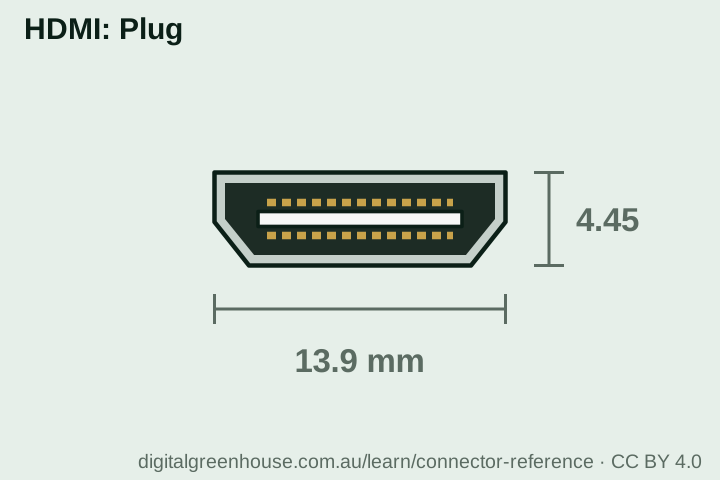 Type A · HDMI13.9 × 4.45 mm, 19 pins. TVs, consoles, laptops
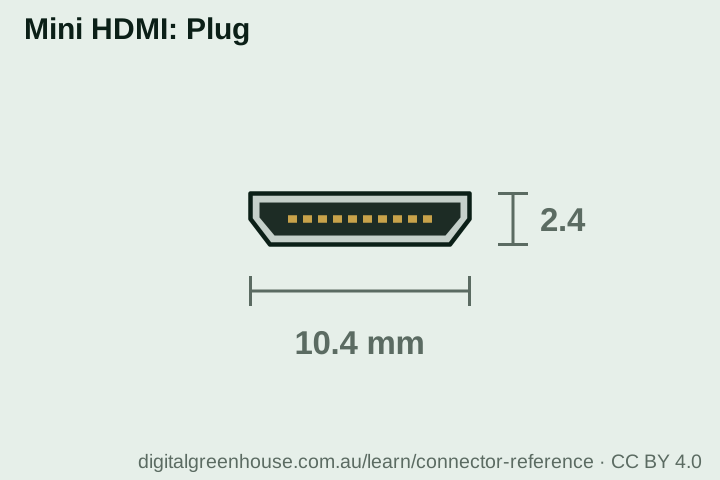 Type C · Mini HDMI10.42 × 2.42 mm, 19 pins. Cameras, some tablets
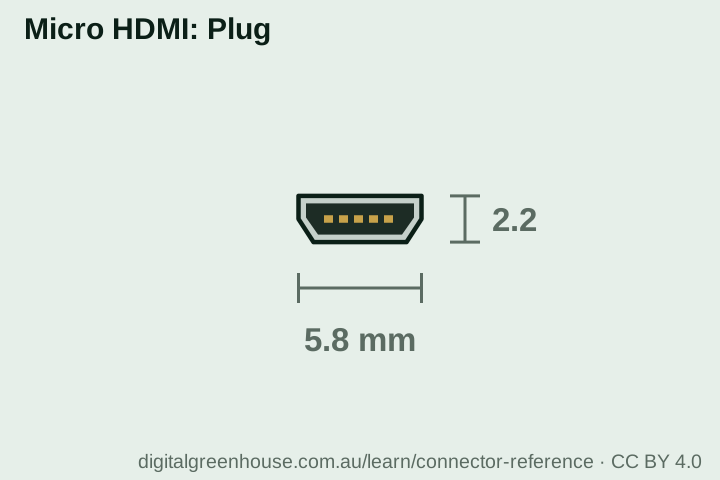 Type D · Micro HDMI5.83 × 2.20 mm, 19 pins. Action cameras, Raspberry Pi
- Type B is a wider 29-pin plug defined in the first specification for dual-link, extra-high resolutions. It was overtaken by faster single links and never appeared in products.
- Type E is a locking plug for cars, added with HDMI 1.4, built to stay put through vibration.
- Type C is not USB-C. The names are a coincidence. Some USB-C ports can send a picture to an HDMI screen, but that is DisplayPort or HDMI carried over USB-C, through an adapter.
The short version
- ARC sends a TV’s sound back down the HDMI cable to a soundbar or receiver. It arrived in HDMI 1.4 and has the same capacity as an optical cable.
- eARC, from HDMI 2.1, has about ten times the room: lossless surround and Blu-ray Atmos. Both ends must have it.
- Both use pins 14 and 19. CEC on pin 13 handles the remote-control side, under a different name on every brand of TV.
- Use the port marked ARC or eARC, turn CEC on, set the TV’s sound output to HDMI, and use an Ultra High Speed cable.
- HDMI versions run from 1.0 in 2002 at 4.95 Gbit/s to 2.2 in 2025 at 96 Gbit/s, through the same plug.
- “HDMI 2.1” on a port doesn’t promise any particular feature. Check for the feature itself.
Want the home theatre or meeting room sorted?
We set up TVs, soundbars, projectors and meeting-room screens for homes and small businesses around Sydney, and untangle the ones that have stopped talking to each other.